WhatsApp Account Warmer for Windows
A new number that suddenly sends hundreds of messages looks like spam. LeadTrapper's warmer has your own accounts talk to each other first, with natural conversation and random pauses, so each number builds real send-and-reply history. $50 a year after a 14-day free trial.
Download for Windows$50 a year · 14 days free · no card needed · Windows 10 and 11
What the WhatsApp warmer does
- Runs a real two-way conversation. Two or more of your own accounts take turns sending and replying, so every number both sends and receives.
- Two ways to pair accounts. One to One: accounts pair up and exchange messages in turns. One to Many: the first account messages all the others in sequence.
- Warms in groups too. The Group Warmer has your accounts take turns posting in a WhatsApp group they all belong to. Communities and channels are left out.
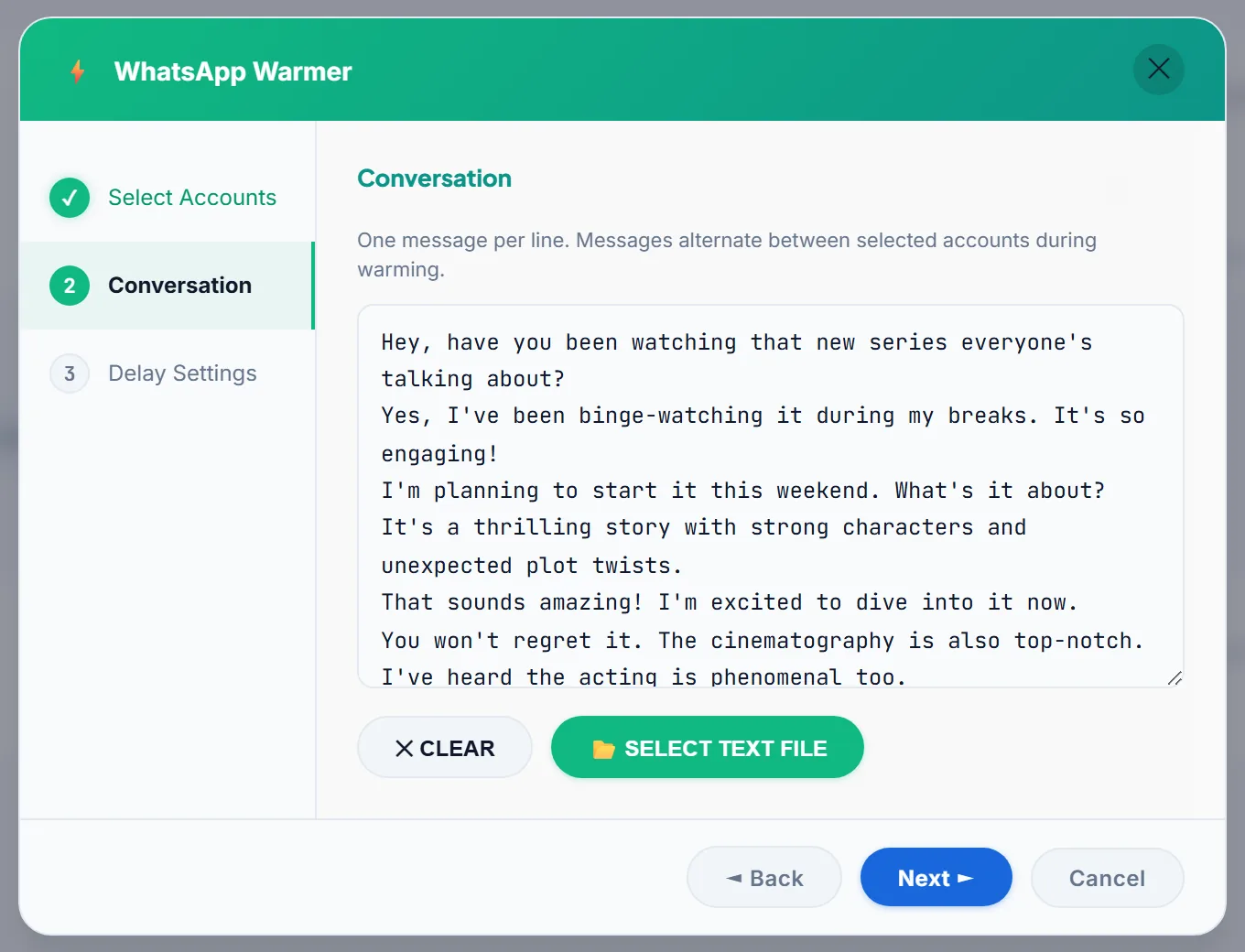
- Uses your own words. A ready-made conversation is included; replace it, or load your own text file with one message per line.
- Paces itself. A random delay between messages, between the minimum and maximum seconds you choose.
- Shows every message. A live log lists who sent what, to whom and when.
- Stops itself when something is wrong. The warmer stops after 10 failed sends in a row.
How it works
- Connect your accounts. Add at least two of your own WhatsApp numbers in LeadTrapper.
- Set the conversation and delays. Keep the built-in conversation or load your own, and choose how long to wait between messages.
- Start warming. Let it run for a few days before the number’s first campaign, then begin with small batches in the WhatsApp bulk sender.
Warming, ghost chatting and delays
Warming is one of three habits that keep a number healthy. Ghost chatting browses other chats between sends, and delays space the messages out. They solve different problems; see warm-up vs ghost chatting vs delays for when to use each, and work out your pauses with the WhatsApp delay calculator.
No tool can promise a number will never be banned. What decides it is mostly how many people block or report you, so send to people who expect your message.
Who uses a WhatsApp warmer
- Anyone with a new number that’s about to send its first campaign.
- Agencies and sales teams running several numbers at once.
- Businesses bringing back a number that’s been quiet for months.
Try the WhatsApp warmer free for 14 days
Tips for warming well
- Start a few days before the first campaign, then begin with small batches.
- Vary the words. Write lines like {Hi|Hello|Hey}, how are you? and the warmer picks one option each time, so the same text isn’t repeated for hours.
- Use realistic delays. A wider gap between the minimum and maximum delay looks more like a person.
- Warm in groups too. The Group Warmer adds group activity on top of private chats.
- Leave it running. The warmer keeps going until you press Stop, so it can run overnight.
Common problems
- “STOPPED: 10 sends failed in a row.” One of the accounts is probably disconnected. Check the WhatsApp accounts are still connected, then start again.
- The warmer won’t start. It needs at least two of your own connected accounts.
- The Group Warmer posts nothing. All selected accounts must be members of the group. Communities and channels are left out.
Warmer or warming by hand?
| LeadTrapper warmer | Warming by hand | |
|---|---|---|
| Effort | Runs by itself until you stop it | You and others chatting from several phones |
| Varied messages | Your own lines, with options picked at random | Natural, but slow |
| Stops on trouble | After 10 failed sends in a row | When you notice |
| Cost | $50 a year, all features | Free |
Guides
- WhatsApp account warmer: how to warm up a number
- WhatsApp group warmer: how it warms accounts in groups
- Why a campaign stopped automatically
- Multiple WhatsApp accounts with proxy isolation
Price
The warmer is part of LeadTrapper, $50 a year for every feature, including the WhatsApp bulk sender, Google Maps scraper, Number Filter and the Instagram, Facebook, TikTok and LinkedIn lead finders. Every new user gets 14 days free with no card. See pricing.
Download LeadTrapper for Windows
Questions
What does a WhatsApp warmer do?
It builds normal-looking history on a number before you use it for campaigns. LeadTrapper has two or more of your own accounts exchange messages, with varied wording and random delays, so each number both sends and receives.
How many accounts do I need?
At least two of your own WhatsApp accounts connected in LeadTrapper. The Group Warmer also needs a WhatsApp group that the selected accounts all belong to.
Does warming guarantee my number will not be banned?
No. Warming lowers the risk of a brand-new number being flagged, but bans depend mostly on how people react to your messages. Send to people who expect to hear from you and keep your pace slow.
What happens if sending fails?
The warmer stops by itself after 10 failed sends in a row, so a disconnected or restricted account does not keep trying.
How much does it cost?
$50 a year for every LeadTrapper feature, including the warmer, after a 14-day free trial with no card needed.
How long should I warm a new number?
WhatsApp publishes no official number. Many people warm for a few days before the first campaign, then start with small batches and grow slowly.
Can I write my own warm-up messages?
Yes. Replace the built-in conversation or load a text file with one message per line. Write options in curly brackets, like {Hi|Hello}, and the warmer picks one each time.
Does it work in WhatsApp groups?
Yes. The Group Warmer has your accounts take turns posting in a WhatsApp group they all belong to. Communities and channels are left out.
Works well with
WhatsApp Bulk Sender
Personalised messages to a whole list. Included in the same $50/year app.
WhatsApp Number Filter
Check numbers before you send. Included in the same $50/year app.
Google Maps Scraper
Business leads from any city. Included in the same $50/year app.