WhatsApp Bulk Sender for Windows
Upload an Excel or CSV list, write one message, and LeadTrapper sends a personalised version to every number from your own WhatsApp accounts. No Business API and no monthly fee: $50 a year after a 14-day free trial.
Download for Windows$50 a year · 14 days free · no card needed · Windows 10 and 11
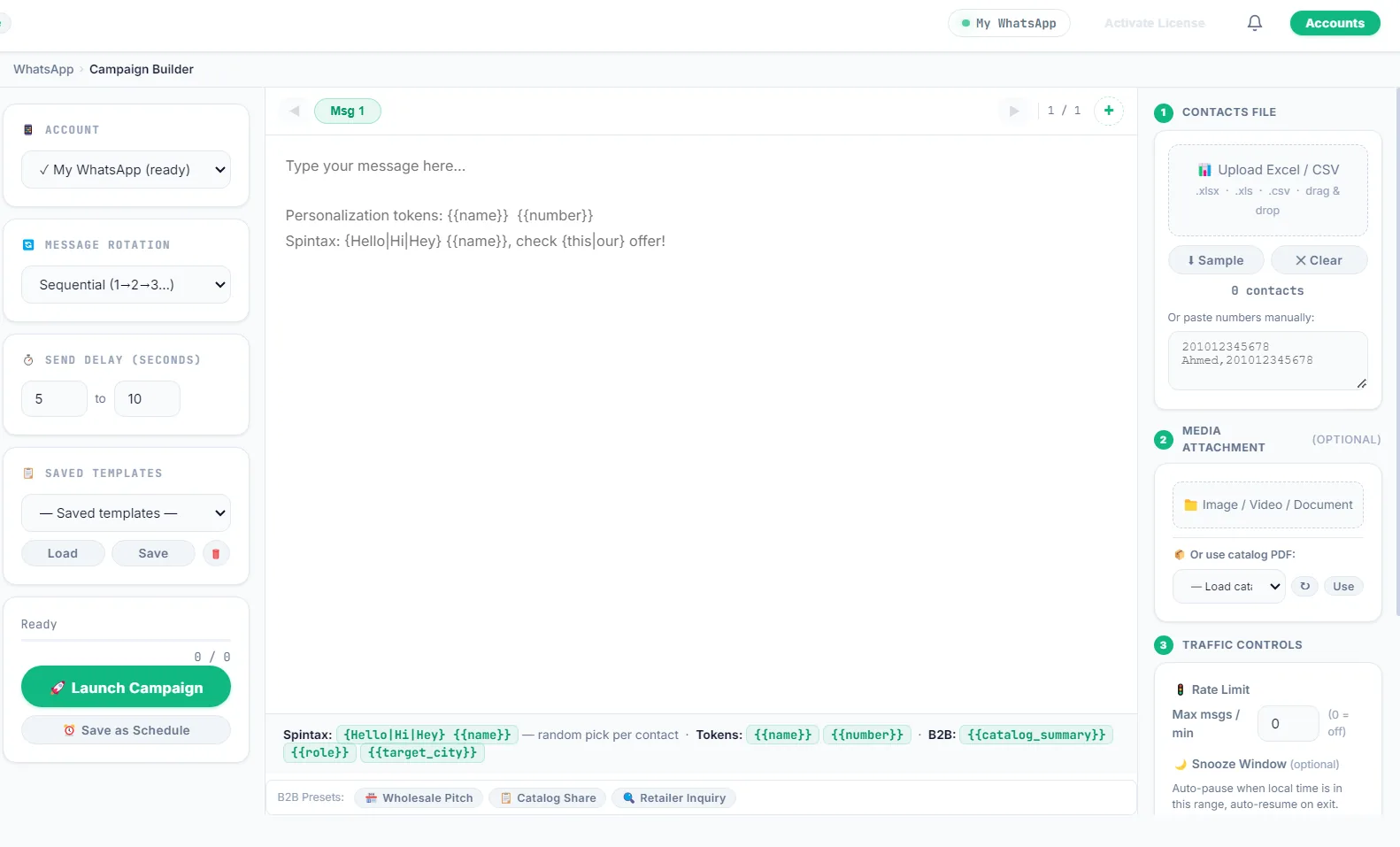
What the WhatsApp bulk sender does
- Sends to a whole list. Upload an Excel or CSV file, or paste numbers. Each number gets its own chat; nobody needs to be saved as a contact.
- Personalises every message. Use
{{name}}or any column from your file, so each person sees their own name, company or city. - Varies the wording. Spin syntax such as
{Hello|Hi|Hey}picks a different word per contact, and you can write several message versions that rotate through the list. - Attaches files. Add an image, a video, a document or a product catalog PDF to the message.
- Uses several WhatsApp accounts. Each account runs in its own isolated browser session and can use its own proxy, and a campaign can spread across them.
- Paces itself. A random delay between messages (for example 5 to 10 seconds), a messages-per-minute limit and an optional snooze window that pauses sending during the hours you choose.
- Schedules campaigns. Save a campaign as a schedule and it starts at the time you set.
- Respects opt-outs. Numbers on your blocklist are skipped in every campaign.
- Stops itself when something looks wrong. A campaign stops after 5 failed sends within an hour and pauses that account for 30 minutes. These are LeadTrapper’s own limits, not WhatsApp’s.
- Picks up where it stopped. If the app or the computer restarts mid-campaign, LeadTrapper offers to resume from the last number sent.
- Reports every send. Download a report of which numbers were sent, failed or skipped.
How it works
- Get your list. Use your own customer list, or build one with the Google Maps scraper inside LeadTrapper.
- Clean it. Run the WhatsApp Number Filter so you only send to numbers that are on WhatsApp. Sending to dead numbers is one of the fastest ways to get flagged.
- Write and send. Write your message with names and variations, set the delay, pick your accounts and launch. Replies arrive in the live chat inbox.
Your first campaign, step by step
-
Connect your account. Open WhatsApp Accounts in LeadTrapper and scan the QR code with your phone, as you would for WhatsApp Web.
-
Load your list. Upload an Excel or CSV file with a phone column, plus any columns you want in the message, such as name or company.
-
Write the message with variations. For example:
{Hi|Hello} {{name}}, I found {{company}} on Google Maps. {We help|We work with} clinics like yours to get more bookings. Would a short call this week suit you?One contact reads “Hi Sara, I found Smile Dental on Google Maps. We help clinics like yours…” and the next reads “Hello Omar, I found Bright Smile on Google Maps. We work with clinics like yours…”. Every message is personal and no two are identical.
-
Set the pace. A random delay of 5 to 10 seconds between messages is a sensible start. Add a snooze window if you only want to send during working hours.
-
Send a small first batch. Start with your warmest 20 or 30 contacts, watch the replies, then send the rest. Replies come into the live chat inbox.
-
Download the report. See which numbers were sent, failed or skipped, and remove the failed ones from your next list.
Who uses a WhatsApp bulk sender
- Shops and restaurants telling their own customers about offers, new stock or opening hours.
- Agencies and freelancers contacting local businesses found with the Google Maps scraper.
- Clinics, salons and gyms sending reminders and follow-ups to clients who gave their number.
- Real estate agents and car dealers sharing new listings with buyers who asked to hear about them.
Common problems
- The campaign stopped by itself. LeadTrapper stops a campaign after 5 failed sends within an hour and pauses that account for 30 minutes, to protect the number. Read why a campaign stopped automatically before restarting.
- Many sends failed. Usually the numbers aren’t on WhatsApp or are in the wrong format. Run the list through the WhatsApp Number Filter first; it adds your country code and keeps only the numbers that are on WhatsApp.
- The computer restarted mid-campaign. Open LeadTrapper again and it offers to resume from the last number sent, so you don’t have to start over.
- People reply “who is this?” Put your name and business in the first line, and say where you found them. A clear message gets fewer blocks.
Bulk sender or WhatsApp Business API?
| LeadTrapper bulk sender | WhatsApp Business API tools | |
|---|---|---|
| Setup | Install, scan the QR code, send the same day | Meta business verification and template approval |
| Cost | $50 a year | A monthly plan plus Meta’s per-message charges |
| Message templates | Write anything, change it any time | Each template approved by Meta first |
| Who you can message | Anyone in your list (ask for consent) | Opted-in contacts, under Meta’s rules |
| Risk | Your own numbers can be restricted | Official channel, lower ban risk |
If you send to customers who asked to hear from you at very large volume, the API is the safer channel. For outreach to a list you built yourself at small business scale, a desktop sender is faster and far cheaper. More on this in do you need the WhatsApp Business API.
Compared with other desktop bulk senders
| LeadTrapper | WASender | |
|---|---|---|
| Price | $50 a year | Free plan limited to 30 uses per task, or Pro at $29.90 a month |
| Runs on | Windows | Windows and macOS |
| Builds the list for you | Google Maps, Instagram, Facebook, TikTok and LinkedIn lead finders | Not listed on its pricing page |
| Message variation | Spin syntax and rotating message versions | Not listed on its pricing page |
| Checks numbers first | Yes, the Number Filter | Yes |
WASender’s prices are from its pricing page in October 2026. Over a year, its Pro plan costs about seven times LeadTrapper’s price. More in WASender alternative.
Keep your accounts safe
WhatsApp’s terms do not allow unsolicited bulk messaging, and no tool can promise an account will never be banned. What decides it is mostly how many people block or report you. So ask for consent where you can, send small batches first, and use the tools LeadTrapper gives you:
- Warm up new numbers before the first campaign.
- Work out safe pauses with the WhatsApp delay calculator.
- Read how to send 1,000+ messages without a ban for the full method.
- See why a campaign stopped automatically and what to do next.
Price
One payment of $50 a year covers unlimited campaigns on more than one WhatsApp account, with no per-message fees and no Meta charges. It also includes everything around the sending: the Google Maps scraper to build the list, the Number Filter to clean it, the account warmer for new numbers and the keyword chatbot for replies. Send your first campaign free for 14 days, no card needed. See pricing.
Download LeadTrapper for Windows
Questions
Does the WhatsApp bulk sender need the WhatsApp Business API?
No. LeadTrapper sends through WhatsApp Web with your own accounts, so there is no Meta application, no template approval and no per-message API fee.
Do I need to save the numbers as contacts first?
No. LeadTrapper opens a chat with each number in your list itself, so the numbers do not have to be saved in your phone.
Can it guarantee my number will not be banned?
No tool can. WhatsApp’s terms do not allow unsolicited bulk messaging, and bans depend mostly on how many people block or report you. Message variations, delays, the Number Filter and the automatic safety stops reduce the risk; asking for consent first matters most.
How much does it cost?
$50 a year for every LeadTrapper feature, including the bulk sender, after a 14-day free trial with no card needed.
Does it work on Mac or on a phone?
No. LeadTrapper is a Windows app for Windows 10 and 11, installed from the Microsoft Store.
How many messages can I send per day?
WhatsApp doesn’t publish a safe daily number, and enforcement depends mainly on how many people block or report you. Start with small batches, watch replies and blocks, and use delays and message variations so messages differ. A second account spreads the sending across two numbers, but each account carries its own risk.
Works well with
WhatsApp Account Warmer
Warm up new numbers safely. Included in the same $50/year app.
WhatsApp Number Filter
Check numbers before you send. Included in the same $50/year app.
Google Maps Scraper
Business leads from any city. Included in the same $50/year app.